
Send a Digital Impression
Sending your digital impression to DAL will eliminate the time for shipping your case to the laboratory, reduce chair-time, and increase communication with the laboratory. We accept all types of digital impressions and we’re also able to work with traditional PVS impressions.
We accept files from all scanners including those listed below. Detailed submission instructions are included under each manufacturer. Should you have any questions or need assistance connecting your scanner to DAL, please call us at 1-800-227-4141 and we’ll be happy to help you with your submission.
Please note, if you are sending a digital file, we do require a completed and signed Rx form to accompany your uploaded file.
Are you a New Customer?
Send us your digital files and we’ll automatically set up a new account for your office.
Scanners
To add Dental Arts Lab or DAL Signature to your iTero scanner, please call 800-577-8767.
When prompted on the phone recording, please select 1, then option 1.
Request that DAL Dental Arts Laboratories or DAL Signature be added to your iTero scanner.
DAL's iTero PEORIA lab number is 497.
DAL's iTero SIGNATURE lab number is 3595.
Once you have entered the lab number, go to SETTINGS on your iTero scanner and click-on SYNC CONFIGURATION.
To add Dental Arts Lab or DAL Signature to your Trios (3Shape) scanner:
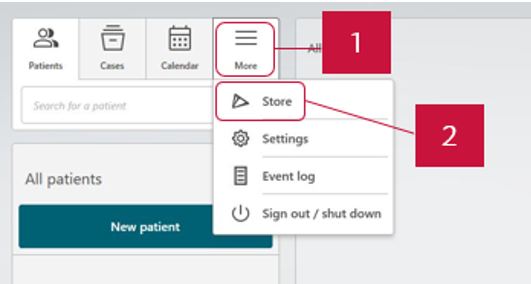
1. Open 3Shape Unite and go to ‘More’ and then click ‘Store’.
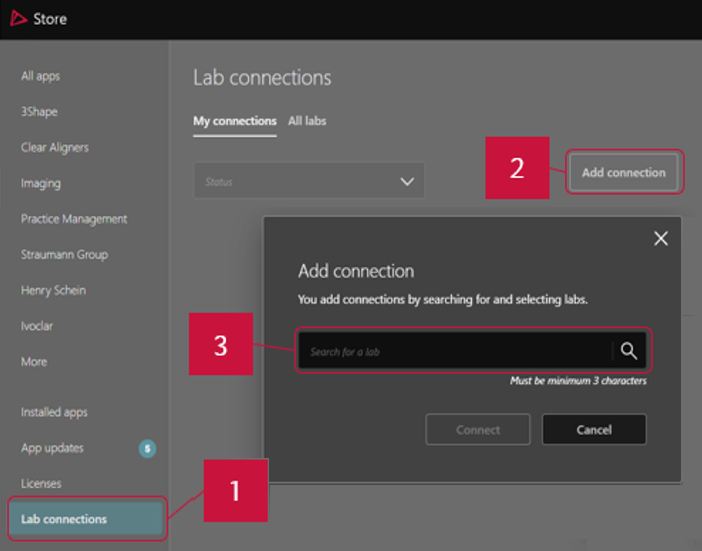
2. Go to ‘Lab connections’, click ‘Add connection’ button and type in digital@dentalartslab.com
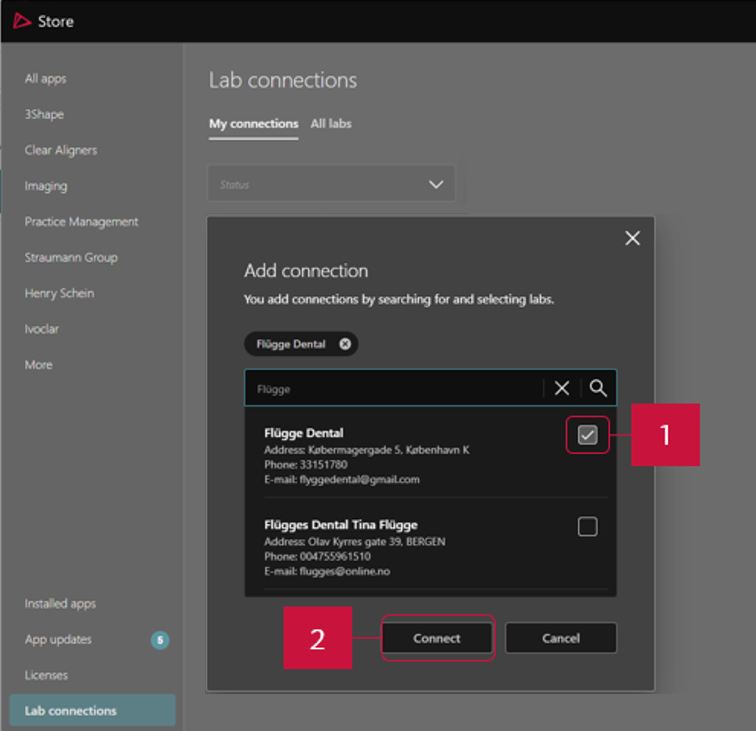
3. Once you have entered details of the lab, choose the lab you want to connect to from the search results and click ‘Connect’. The connection request has been sent and will have to approved by the lab. Once the lab has approved your connection request your option to ‘Cancel request’ will change to ‘Disconnect’.
To add Dental Arts Lab or DAL Signature to your Medit scanner, go to your web browser and type: www.meditlink.com
Log into your Medit Link Account
Once you are logged-in, click on PARTNERS on the left side of the screen.
Search for DAL Dental Arts Lab digital@dentalartslab.com and click on REQUEST PARTNERSHIP.
DAL DENTAL ARTS LAB will then be added to your MY PARTNER and PARTNERSHIP PENDING should be listed.
Go to your web browser and type: customer.connectcasecenter.cn
Login to MY CONNECT CASE CENTER.
Go to PARTNERS.
Easiest way to find DAL is by entering DAL zip code 61603, click on DAL.
Click on ADD DAL (digital@dentalartslab.com) to complete the process.
On your scanner, go to VISIT CARESTREAM CONNECT.
Search for us by typing: digital@dentalartslab.com
Add DAL Dental Arts Laboratory to your scanner.
Please select DAL Dental Arts Laboratory when submitting STL files.
Send email with files to our digital file address: digital@dentalartslab.com
On your scanner select FIND A LAB.
Search for digital@dentalartslab.com
Add DAL Dental Arts Laboratory.
Select DAL Dental Arts Laboratory when submitting cases.
From your scanners touch screen after performing the scan and selecting your return date
Select LABORATORIES on the left
Choose DAL Dental Arts Laboratories or digital@dentalartslab.com
Fill out prescription and add scanned files.
Uploading Large Files
For very large STL or similar files that need to be uploaded or for scanners not listed, please click the Send Files button below to upload your files.
